Free overview · Shanghai arrivals
First, check your airport and terminal
Use the airport code on your flight details: PVG is Pudong; SHA is Hongqiao. After collecting your bags and clearing customs, choose your terminal below.
Official taxi
No working phone? Start here.
Follow Taxi / 出租车 to the managed queue. Bring the hotel’s Chinese address and RMB cash; international bank-card acceptance varies.
DiDi / ride-hailing
Match the floor as well as the pin.
Follow Ride-hailing / 网约车. A car directly below you may look “nearby” on the map. Compare the parking building, floor, zone and plate.
Keep these ready before you leave arrivals
- Hotel name, full Chinese address and front-desk number saved offline.
- RMB cash plus a working app payment if you plan to use DiDi.
- Phone battery, mobile data and access to the number on your account.
Use the official queue or your app-matched car. Decline people offering a ride inside arrivals. Ask airport staff if someone says the normal queue is closed.
Free sample · From the complete guide
Try this part of your Shanghai journey
Book the right car
Check the pickup field first
Confirm PVG or SHA, then T1 or T2. At an airport, select a named pickup point offered by the app. Match its parking building, floor and zone to the signs around you; a moving GPS dot alone is not enough.
Enter your hotel, then check its address
Tap Where to? / Enter Destination. Search the hotel name or paste its Chinese address. Check the street and branch before confirming—Shanghai has many hotels with similar names.
Choose the car and review the price
Compare the available categories, estimated wait and fare. For large bags, choose a larger vehicle and send the bag count to the driver after matching. Six seats do not guarantee space for six suitcases. Review any fee or payment message before confirming.
Request when you are ready to meet
Use the terminal instructions below to reach the assigned pickup area. Submit the request, keep the app open and note the driver's plate, car model and meeting point.
Visual example · Set up payment: four real app screens
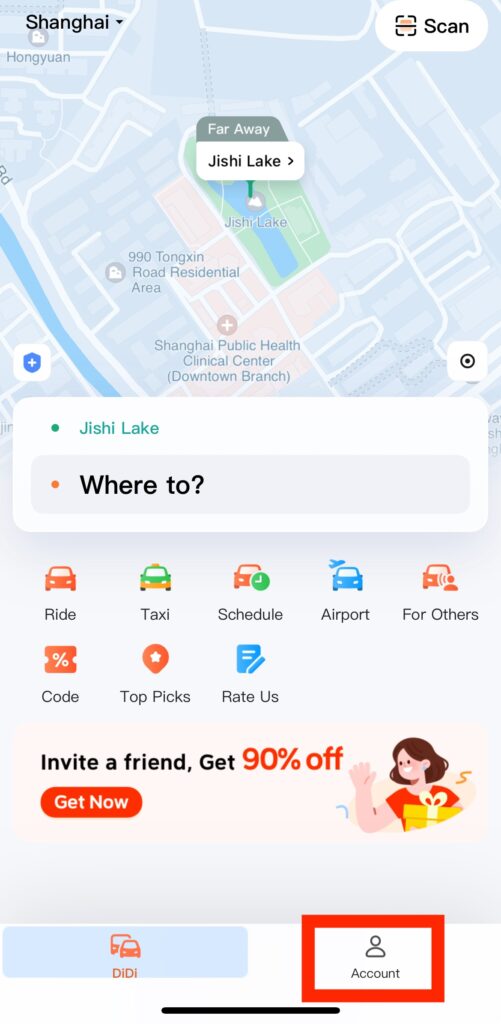
Tap an image to enlarge the original. App labels may differ by version.
About this excerpt
Selected from How to use DiDi, from opening the app to getting in. Guide updated September 28, 2026. App labels and local arrangements can change.
Inside the Full Guide
Included in the Full Shanghai Guide, together with this city’s Quick Cards.
- How to use DiDi · illustrated
- PVG T1 · taxi & DiDi
- PVG T2 · taxi & DiDi
- SHA T1 · taxi & DiDi
- SHA T2 · taxi & DiDi
- Payment & quick fixes
- Rail alternatives
All three journey stages
Full Shanghai Guide
$39 / city · One-time purchase
All Shanghai guides, step-by-step instructions, troubleshooting, backup options and Quick Cards. Other cities are sold separately.
Use it on your phone and one other device. Emergency help is always free.
Access & purchase details
Personal access tied to your account, on up to 2 registered browsers. Sharing a link does not share your purchased guide. You may show and screenshot Quick Cards for your own trip.
No downloadable offline pack is available. Live human support is not included. Save stores a link on this browser, not an offline copy.
Login sessions last up to 30 days. Sign in again with your email to recover your guides. Each browser counts separately; you can manage registered browsers in your account.
Checkout is not live. Purchase and refund terms will be published before payments open. For an access problem, use Help; do not buy again.