Overview & preparation
Payments in China: what you need to know
QR payments are common. Alipay and WeChat Pay are key tools, but neither should be your only payment option.
Prepare while you are still at home
- ✓Allow time for account, identity or bank checks before travel.
- ✓Eligible international cards can work with supported mobile-payment services; acceptance varies by card and merchant.
- ✓Keep cash and a physical card as alternatives. Carrying a card does not mean every merchant can accept it.
Know where to get practical help
- ✓For setup, QR payment or a declined transaction, choose the matching action guide below.
- ✓Never share a payment code, password or one-time security code with a stranger.
Free sample · From the complete guide
Try this part of your Guangzhou journey
Practical steps
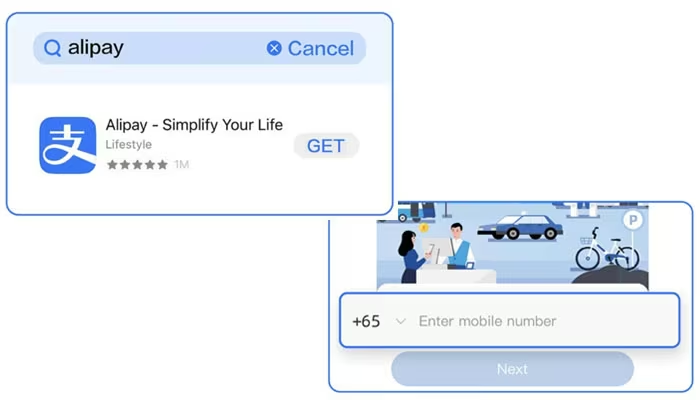
Install the official app and register
Download Alipay from the Apple App Store or Google Play, check the publisher and open the app. Select your country or region code, enter your own mobile number and complete the SMS check. An overseas number works before arrival; if you later buy a mainland SIM, update the registered number inside Alipay rather than creating a second account.
About this excerpt
Selected from Make your first Alipay payment with confidence. Guide updated September 28, 2026. App labels and local arrangements can change.
Inside the Full Payment Guide
Included in the Full Guangzhou Guide, together with this city’s Quick Cards.
- Alipay
- WeChat Pay
- When your payment won’t go through
- Backup options
- Related Quick Cards
All three journey stages
Full Guangzhou Guide
$39 / city · One-time purchase
All Guangzhou guides, step-by-step instructions, troubleshooting, backup options and Quick Cards. Other cities are sold separately.
Use it on your phone and one other device. Emergency help is always free.
Access & purchase details
Personal access tied to your account, on up to 2 registered browsers. Sharing a link does not share your purchased guide. You may show and screenshot Quick Cards for your own trip.
No downloadable offline pack is available. Live human support is not included. Save stores a link on this browser, not an offline copy.
Login sessions last up to 30 days. Sign in again with your email to recover your guides. Each browser counts separately; you can manage registered browsers in your account.
Checkout is not live. Purchase and refund terms will be published before payments open. For an access problem, use Help; do not buy again.